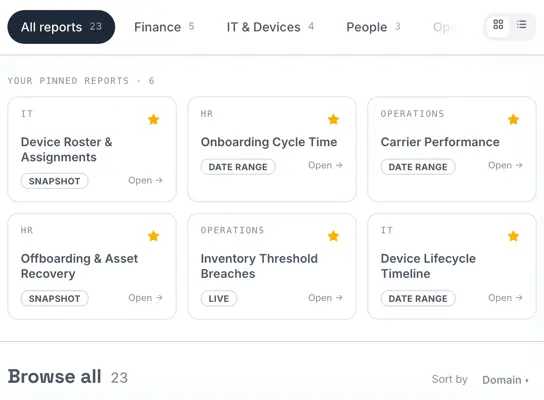
See What’s Happening. Know What Needs Attention.
Most organizations already have employee and device data. The challenge is turning information spread across spreadsheets, emails, carrier portals, inventory records, support systems, and vendor updates into a useful view of the work.
Rely-IQ brings employee-device activity, workflow status, ownership, exceptions, and lifecycle information together, helping HR, IT, Operations, and Finance see what is happening and where attention is needed.
What Are Workforce Operations Analytics and Reporting?
Workforce operations analytics and reporting organize employee-device activity into dashboards, reports, status views, and practical insights.
Reporting shows what has happened and where work currently stands. Analytics helps teams identify patterns, exceptions, aging items, and opportunities to improve onboarding, support, logistics, recovery, inventory, redeployment, and employee readiness.
Reporting Is More Than a Record of What Happened
A report has limited value if it only documents completed activity.
Your teams also need to know what remains open, where progress has slowed, who is responsible, and which items require follow-through.
Rely-IQ connects each status with the context behind it, helping teams move from reviewing information to knowing what should happen next.
Activity Report
Operational Visibility
The value of reporting is not simply knowing what happened. It is knowing what requires attention next.
See the Full Employee Device Picture
Employee-device operations create work across the entire workforce lifecycle. Rely-IQ brings that information into one shared view so teams can see how individual tasks and events relate.
Employee Readiness
See whether equipment preparation, delivery, setup, and other device-related onboarding activities are progressing toward day-one readiness.
Device Status
Understand whether equipment is awaiting preparation, in transit, active, under repair, being recovered, ready for reuse, or approaching retirement.
Logistics Activity
View device deliveries, returns, recoveries, redirects, and exceptions across offices and remote employees.
Support Needs
Identify employee-device questions, repairs, replacements, escalations, and unresolved support needs.
Recovery and Redeployment
See which devices remain outstanding, which have been returned, and which may be prepared for another employee.
Inventory and Planning
Review available equipment, idle devices, upcoming requirements, and lifecycle decisions that need consideration.
One shared view helps teams see how employee needs, device status, logistics, support, and lifecycle decisions affect one another.
Know What Requires Action
Your teams should not have to review every record manually to find the work that matters most.
Rely-IQ helps surface incomplete tasks, aging items, exceptions, and lifecycle events that may need additional attention.
Instead of searching for unfinished work, your teams can focus on the items that still need to move forward.
Onboarding at Risk
Identify equipment or activities that may affect an employee’s readiness for day one.
Outstanding Recoveries
See devices that have not yet been returned or still require employee follow-up.
Delivery Exceptions
Review shipments affected by delays, address issues, missed deliveries, damage, or changing plans.
Support Activity
Identify employee needs requiring repair, replacement, escalation, or additional coordination.
Available for Redeployment
Recognize recovered equipment that may be prepared and assigned to another employee.
Approaching Retirement
See devices that may require replacement planning, retirement, or further review.
Instead of searching for unfinished work, your teams can focus on the items that still need to move forward.
Reporting Across Every Stage
Reporting should follow equipment throughout its journey, not stop once a device is assigned.
01
Plan
Review anticipated equipment needs, available inventory, employee timing, locations, and upcoming workforce changes.
02
Prepare
See devices awaiting assignment, configuration, inspection, packaging, or approval.
03
Deploy
Monitor shipping, delivery, employee receipt, and day-one readiness.
04
Support
Review active issues, repairs, replacements, and employee-device support needs.
05
Recover
Track return instructions, outstanding equipment, follow-up, receipt, and inspection.
06
Redeploy or Retire
Identify devices available for reuse and equipment requiring repair, replacement, or retirement.
Lifecycle reporting helps teams see where each device stands, which work is complete, and what still requires attention.
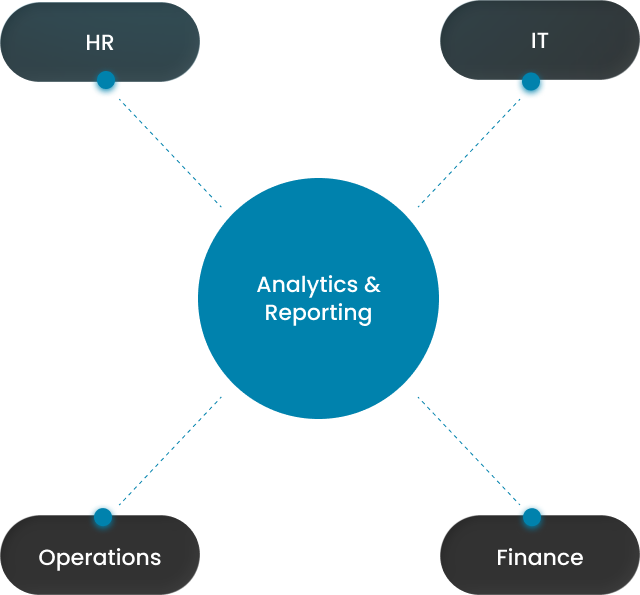
Insights for HR, IT, Operations, and Finance
Each team may use operational information differently, but everyone should work from the same underlying record.
A shared record gives each team information relevant to its responsibilities without creating separate versions of the same activity.
HR
Monitor onboarding readiness, employee transitions, equipment-related delays, and workforce events requiring follow-through.
IT
Review device preparation, assignments, support needs, repairs, replacements, and lifecycle status.
Operations
See workflow progress, logistics activity, vendor involvement, exceptions, ownership, and outstanding work.
Finance
Maintain greater insight into equipment accountability, outstanding recoveries, available inventory, reuse opportunities, and replacement planning.
A shared record gives each team information relevant to its responsibilities without creating separate versions of the same activity.
Turn Operational Data Into Better Decisions
Information becomes more valuable when it helps teams recognize patterns, priorities, and available options.
Device Purchasing
Use lifecycle and inventory information to support more informed equipment-purchasing decisions.
Recovery Priorities
Identify outstanding devices, aging requests, and recoveries that may need additional follow-up.
Reuse and Redeployment
Recognize returned equipment that may be inspected, prepared, and assigned to another employee.
Replacement Planning
See which devices may be approaching the end of their useful life and require review.
Process Improvement
Identify recurring delays, exceptions, or handoffs that may indicate an opportunity to improve the workflow.
Workforce Planning
Prepare for upcoming employee starts, role changes, relocations, and departures that may create equipment needs.
Better context helps teams make more intentional decisions about equipment, employees, and the work connecting them.
Reports That Reflect How Your Organization Works
No two organizations manage workforce operations in exactly the same way.
Reporting needs may vary based on workforce size, team responsibilities, device programs, locations, leadership priorities, and the stages creating the greatest workload.
Rely-IQ helps organize information around the way your organization operates, whether teams need greater insight into onboarding readiness, active support, logistics, recovery, inventory, or lifecycle activity.
The goal is not to create more reports. It is to make the information your teams already manage easier to interpret and use.
Platform Visibility + Operational Context
Technology and Managed Insight Working Together
The platform organizes employee-device information, status, ownership, and reporting history. The Rely-IQ team connects that information with the work required to keep activities moving.
The Platform Provides
- Employee and device context
- Lifecycle status and workflow progress
- Open activities and ownership
- Exceptions and aging items
- Reporting history and operational summaries
- Insight across onboarding, support, logistics, recovery, and reuse
The Rely-IQ Team Helps
- Review incomplete or aging activity
- Coordinate employee, team, vendor, and carrier follow-up
- Clarify exceptions and responsibilities
- Connect reporting with managed lifecycle services
- Keep records and required actions aligned
- Identify recurring issues that may benefit from process improvement
The platform shows what is happening. Our team helps make sure the work keeps moving.
Explore Related Platform Capabilities
Analytics and reporting become more useful when the information remains connected to the services and workflows creating it.
Device Lifecycle Management
See how equipment moves from planning and preparation through support, recovery, reuse, and retirement.
Multi-Location Logistics
Maintain insight into device deliveries, recoveries, redirects, and exceptions across offices and remote employees.
Managed Support & Employee Experience
Understand open employee needs, device issues, repairs, replacements, escalations, and support activity.
Security, Compliance & Integrations
Learn how platform access, operational records, safeguards, and connected systems support trusted workforce operations.
See What Your Teams Need to Know Next
Better reporting begins with understanding where your information currently lives and what your teams still struggle to see.
We’ll learn how you track onboarding, device status, logistics, support, recovery, inventory, and lifecycle activity, then help identify where Rely-IQ can improve oversight, reduce manual reporting, and make unfinished work easier to manage.
Frequently Asked Questions About Workforce Operations Analytics and Reporting
What are workforce operations analytics and reporting?
Workforce operations analytics and reporting organize employee-device activity into dashboards, reports, status views, and operational insights. They help teams understand what has happened, where work currently stands, which items require attention, and where patterns or exceptions may affect onboarding, support, logistics, recovery, inventory, redeployment, or employee readiness.
What information can Rely-IQ help organizations report on?
Rely-IQ can help organize information across employee-device onboarding, preparation, assignments, shipping, support, repairs, replacements, recovery, inspection, redeployment, inventory, and retirement. Reporting can also provide context around ownership, open activities, lifecycle status, delivery exceptions, outstanding returns, and employee readiness.
How is workforce operations reporting different from inventory tracking?
Inventory tracking typically shows which devices an organization owns, where they are located, and who they are assigned to. Workforce operations reporting also shows the activity surrounding those devices, including preparation, delivery, support, recovery, exceptions, ownership, workflow progress, and the actions required to move each device forward.
Which teams can use Rely-IQ analytics and reporting?
Rely-IQ analytics and reporting can support HR, IT, Operations, and Finance. Each team can use the information according to its responsibilities, including employee readiness, device preparation, lifecycle status, logistics, support activity, equipment accountability, outstanding recoveries, inventory availability, reuse opportunities, and replacement planning.
Can Rely-IQ report across onboarding, support, logistics, recovery, and redeployment?
Yes. Rely-IQ can bring activity from multiple stages of the employee device lifecycle into one reporting environment. This helps teams understand how onboarding, device preparation, shipping, support, recovery, inspection, reuse, and retirement relate to one another instead of reviewing each activity through separate records or systems.