
Connect Employee Devices, Workforce Events, and Operational Work in One Platform.
Growing organizations already have systems for employee records, device inventory, support requests, shipping, security, access, and vendors.
The challenge is what happens between them.
A new hire, relocation, device issue, replacement, role change, contractor completion, or employee departure can create work across HR, IT, Operations, Finance, managers, carriers, and service providers.
The Rely-IQ Workforce Operations Platform connects that work through one operating model, helping authorized teams understand where activity stands, who owns the next step, and which exceptions still require attention.
Combined with managed services, the platform creates a more visible and accountable way to coordinate the operational work surrounding company-issued employee technology.
What Is the Rely-IQ Workforce Operations Platform?
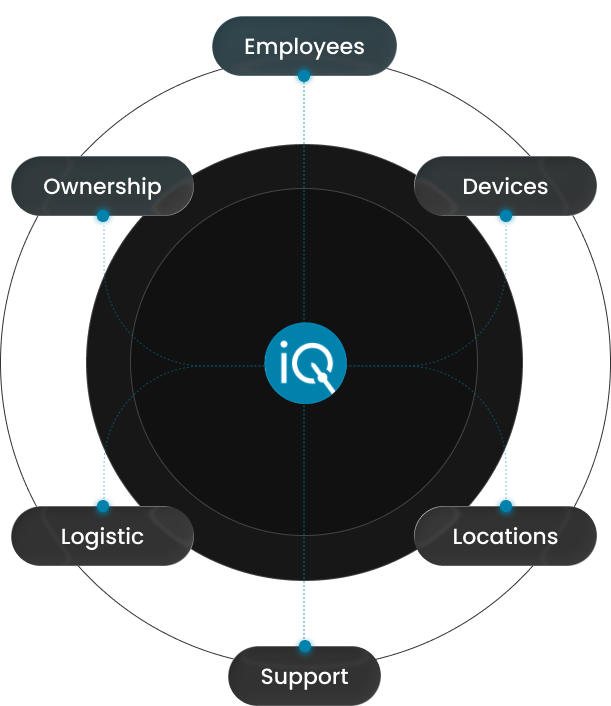
The Rely-IQ Workforce Operations Platform is the operating layer connecting workforce events with the company-issued employee technology work they create.
It brings together available employee and device context, approved destinations, service activity, ownership, exceptions, recovery, lifecycle status, and next actions.
Device management software may focus on inventory, configuration, security, or technical status. A Workforce Operations Platform also connects the employee, destination, operational responsibility, and next action surrounding the device.
Workforce Enablement is the platform capability that connects approved information, services, responsibilities, and actions across the event. The platform provides visibility into status, ownership, exceptions, and next steps, while managed execution helps move approved operational work forward.
Employee Readiness reflects whether the included device, destination, delivery, communication, support direction, and open actions reached their approved operational state.
Your Systems May Be Working While the Overall Process Remains Disconnected
Most growing organizations already use systems for employee information, device inventory, support tickets, endpoint management, shipping, purchasing, security, access, and vendors.
Those systems may each hold accurate records. But a workforce event rarely stays inside one system.
A new hire may begin in an HR platform. Device requirements may arrive through email. A destination may be confirmed by a manager. Delivery may be tracked through a carrier portal. Support may begin in a ticketing system. A replacement may require Finance approval. A departure may begin before anyone confirms which equipment must be recovered.
The records may be accurate while the work between them still depends on spreadsheets, chat, email, manual follow-up, and informal handoffs.
That is where ownership becomes unclear, exceptions remain open, and internal teams spend time reconstructing what has already happened.
Organizations usually do not lack systems. They lack one operating layer connecting the work that moves between them.
Connect the Employee, Device, Destination, Owner, and Next Action
A workforce event does not create only a record. It creates operational work that must move through people, systems, providers, destinations, decisions, exceptions, and next actions.
The Rely-IQ Workforce Operations Platform helps connect:
The Workforce Event

The new hire, relocation, role change, support request, replacement, contractor completion, employee departure, or other approved event creating the work.
The Employee and Device Context
The available employee, role, manager, department, device, assignment, and lifecycle information needed within the approved scope.
The Destination and Service Activity
The approved location, delivery, support, replacement, return, or recovery activity connected to the event.
Ownership and Exceptions
The current owner, unresolved issue, required handoff, and next approved action.
The Documented Outcome
The operational state showing what was completed, what remains open, and what must happen next.
A system can record part of the process without owning the complete outcome. The platform helps keep the operational context connected.
See Where Activity Stands, Who Owns It, and What Happens Next
Visibility becomes useful when it helps teams understand more than whether a record exists.
That shared context can reduce the need to search across spreadsheets, emails, tickets, carrier portals, vendor tools, and separate records to understand one employee device operation.
Platform visibility concerns approved employee-device operations. It does not mean employee surveillance, productivity tracking, activity monitoring, attendance enforcement, or unrestricted employee location tracking.
The goal is not to watch employees. It is to make the operational work surrounding company-issued employee technology easier to understand and manage.
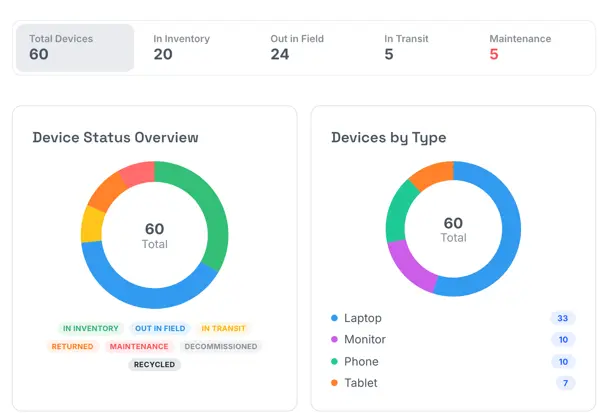
Platform visibility may help authorized teams see:
- which employee and device are involved;
- which workforce event created the activity;
- which approved destination applies;
- where onboarding, delivery, support, replacement, or recovery stands;
- who owns the current step;
- which exceptions require attention;
- which actions remain open;
- what lifecycle activity comes next.

Connect the Information, Responsibilities, and Services Created by Workforce Events
Workforce Enablement is the platform capability connecting the information, services, responsibilities, and actions created when employees join, work, change roles or locations, need support, require replacement equipment, complete assignments, or leave.
It helps connect approved workforce information with device requirements, destinations, communication, support direction, ownership, exceptions, replacement, recovery, and lifecycle activity.
Workforce Enablement does not replace the systems or teams that own employment, identity, access, security, infrastructure, applications, or technical standards.
Its role is to help keep the employee device operation connected as approved information and actions move among the teams and providers involved.
Combine Platform Visibility With People Who Help Move the Work Forward
Software can create records, display status, assign ownership, and identify open activity.
It does not automatically confirm missing information, communicate with an employee, coordinate a changing destination, manage an exception, route a support request, follow up on a return, or move recovered equipment toward its approved next lifecycle stage.
Within the approved scope, the Rely-IQ team may help coordinate:
- employee communication and operational coordination;
- logistics and exception handling;
- support and authorized handoffs;
- replacement, recovery, and lifecycle follow-through.
The platform does not autonomously complete every activity, and the Rely-IQ team does not control every technical, carrier, vendor, or customer decision.
The platform makes the work visible. Our team helps keep it moving.

Understand When the Included Employee Technology Requirements Reach Their Approved State
Employee Readiness reflects whether the included company-issued device, approved destination, delivery, communication, support direction, and open operational actions reached their approved state.
An employee may receive a device while another required action remains incomplete. Delivery alone may not confirm that communication occurred, the support path is clear, an exception was resolved, or another approved step was completed.
The platform helps make those differences visible so teams can understand what is complete and what still requires attention.
Employee Readiness does not automatically confirm employment onboarding, payroll or benefits, identity creation, application access, security authorization, training completion, employee productivity, attendance, complete job readiness, or complete remote-work readiness.
Rely-IQ supports the approved employee device operation. The employer and authorized teams retain responsibility for the broader employment, technical, security, and workplace requirements outside that scope.
Keep Employee Device Context Connected Across Workforce Events
Employee device operations continue long after initial delivery.
The same device may move through deployment, active use, support or replacement, recovery, and an approved next stage.
The platform helps keep the employee, device, destination, service activity, current owner, open exception, recovery status, and next action connected as those changes occur.
A device record explains what the organization owns. Workforce Operations help explain who the device supports, what is happening now, and what action is required next.
The platform can help maintain context when:
a new employee joins;
a role, manager, or work location changes;
an employee relocates;
a device requires support or replacement;
a contractor completes an assignment;
an employee leaves.
Help Every Team Work From a More Connected View
Every department may own part of the employee-device operation. The platform helps authorized teams understand the context relevant to their responsibilities without removing each team’s authority.
The goal is not to give every participant control over every action. It is to provide appropriate operational context to the people responsible for moving the work forward.
HR and People Operations
See approved workforce events, timing, destination, communication, and Employee Readiness context.
Internal IT
See device, support, exception, replacement, and next-action context while retaining technical authority.
Operations
See destination, provider, delivery, ownership, return, and recovery context.
Finance
See approved assignment, replacement, recovery, reuse, and lifecycle context without implying guaranteed financial outcomes.
Managers and Employees
Receive clearer communication, support direction, and status without making managers the informal coordinator for every device event.
The goal is not to give every participant control over every action. It is to provide appropriate operational context to the people responsible for moving the work forward.
Add an Operating Layer Without Replacing Every System, Team, or Provider
Rely-IQ may work alongside the systems and providers already supporting your workforce and technology environment.
Depending on the approved implementation, that may include:
- HRIS and HCM platforms;
- ITSM and help-desk systems;
- MDM, endpoint, and asset-management tools;
- identity, access, and security systems;
- internal IT and current MSPs;
- application owners;
- vendors, carriers, and logistics providers;
- specialized technical partners.
Available integrations and responsibilities depend on system capabilities, technical access, security approval, provider cooperation, supported destinations, and the approved scope.
Rely-IQ does not automatically replace or independently control employment, payroll, benefits, identity creation, application access, cybersecurity operations, infrastructure, every technical standard, employee monitoring, personal devices, home internet, carrier performance, or complete job readiness.
Rely-IQ helps connect approved employee device operations while the appropriate customer teams, systems, and providers retain their authority.
Built for Organizations That Need a More Connected Operating Model
Rely-IQ is built primarily for growing companies with approximately 50–250 employees and can support organizations with up to 2,500 employees where the operating model and service scope are a fit.
The strongest fit is often an organization increasing headcount, expanding geographically, or doing both and beginning to outgrow employee device coordination through spreadsheets, disconnected vendors, portals, tickets, and internal follow-up.
Rely-IQ adds structure and operational capacity without requiring the organization to replace every team, system, or provider already in place.
Use One Connected Platform Across the Services Your Organization Needs
The platform provides the operating layer. Rely-IQ services provide managed execution around specific workforce events and lifecycle needs.

Employee Device Onboarding
Connect approved employee information, device requirements, destinations, preparation, delivery, communication, and support before work begins.

Employee Device Offboarding & Recovery
Coordinate departure information, communication, return activity, receipt, exceptions, assignment updates, and the next approved lifecycle stage.

Managed IT Services
Give employees a Tier 1 IT Support gateway and connect requests with the appropriate internal team, provider, specialist, replacement, logistics, or device action.

Multi-Location Logistics
Connect device preparation, delivery, redirects, replacement, returns, recovery, and next actions across approved destinations.

Device Lifecycle Management
Maintain context as company-issued devices move through deployment, active use, support, replacement, recovery, and the approved next stage.

Additional Pathway: New Hire & Team Swag Kits
Coordinate approved branded employee kits where included in the onboarding and Workforce Operations scope.
Rely-IQ solutions are scoped around employee volume, device activity, operational requirements, and selected services. Organizations can begin with one focused service and expand as their workforce and needs grow.
See Where Employee Device Work Is Becoming Disconnected
A more connected operating model begins with understanding which workforce events create the most work, how employee and device information enters the process, which systems and providers are involved, and where ownership or next actions become unclear.
We’ll learn how your organization currently coordinates onboarding, logistics, employee communication, Managed IT Services, replacement, recovery, and lifecycle activity. We’ll also identify where teams are chasing updates, exceptions remain open, or the complete operational outcome is difficult to understand.
From there, Rely-IQ can help determine whether your organization should begin with one focused service, a specific operational challenge, or a broader Workforce Operations model.
Rely-IQ solutions are scoped around employee volume, device activity, operational requirements, and selected services, allowing your organization to start where the pressure is greatest and expand as its workforce and needs grow.
Frequently Asked Questions About the Rely-IQ Workforce Operations Platform
What is the Rely-IQ Workforce Operations Platform?
The Rely-IQ Workforce Operations Platform is the operating layer connecting workforce events with the company-issued employee technology work they create. It brings together available employee and device context, approved destinations, services, ownership, exceptions, recovery, lifecycle activity, and next actions through a more visible and accountable operating model.
How is a Workforce Operations Platform different from device-management software?
Device management software may focus on inventory, configuration, monitoring, security, or technical device status. A Workforce Operations Platform connects the broader operational work surrounding the employee and device, including destinations, logistics, communication, support, replacement, recovery, ownership, exceptions, and next lifecycle actions.
What does platform visibility show?
Platform visibility helps authorized teams understand available employee and device context, current status, ownership, exceptions, support or logistics activity, recovery progress, lifecycle history, and next actions. It concerns approved employee-device operations and does not mean employee surveillance, productivity tracking, or unrestricted location monitoring.
How do the platform and managed services work together?
The platform makes employee device activity, ownership, exceptions, and next actions more visible. The Rely-IQ team may help coordinate approved communication, logistics, support handoffs, replacement, recovery, exceptions, and lifecycle activity. The platform makes the work visible. Our team helps keep it moving.
What is Workforce Enablement?
Workforce Enablement is the platform capability connecting the information, services, responsibilities, and actions created by workforce events. It helps keep approved workforce information connected with device, destination, communication, support, replacement, recovery, and lifecycle activity.
What does Employee Readiness mean?
Employee Readiness reflects whether the included device, destination, delivery, communication, support direction, and open operational actions reached their approved state. It does not automatically confirm employment onboarding, identity creation, application access, security approval, training, productivity, attendance, complete job readiness, or complete remote-work readiness.
Can Rely-IQ work alongside existing systems, internal IT, and current MSPs?
Yes. Rely-IQ can work alongside HRIS, ITSM, endpoint, asset, identity, access, and security systems, as well as internal IT, current MSPs, application owners, vendors, carriers, and logistics providers. Available integrations and responsibilities depend on technical access, system capabilities, security approval, provider cooperation, and the approved implementation scope.
Can an organization begin with one service?
Yes. An organization may begin with the service or lifecycle area creating the greatest operational pressure and expand over time. Every approved service can remain connected through the broader Workforce Operations model.
What types of organizations are the strongest fit for Rely-IQ?
Rely-IQ is built primarily for growing companies with approximately 50–250 employees and can support organizations with up to 2,500 employees where the operating model and service scope are a fit. Strong-fit organizations are often increasing headcount, expanding geographically, or both and have begun to outgrow employee-device coordination through spreadsheets, disconnected vendors, and internal follow-up.