The Right Device. Ready for Day One.
Employee device onboarding involves more than selecting equipment and sending a package.
The employee, role, work location, start date, device requirements, preparation, delivery, communication, and support path all need to stay aligned.
Rely-IQ coordinates the work behind employee device onboarding, helping organizations prepare equipment, manage delivery, keep teams informed, and move new hires toward day-one readiness.
What Is Employee Device Onboarding?
Employee device onboarding is the coordinated process of identifying a new hire’s equipment needs, assigning and preparing the appropriate device, managing delivery, communicating with the employee, and confirming that device-related onboarding activities are ready for the employee’s start date.
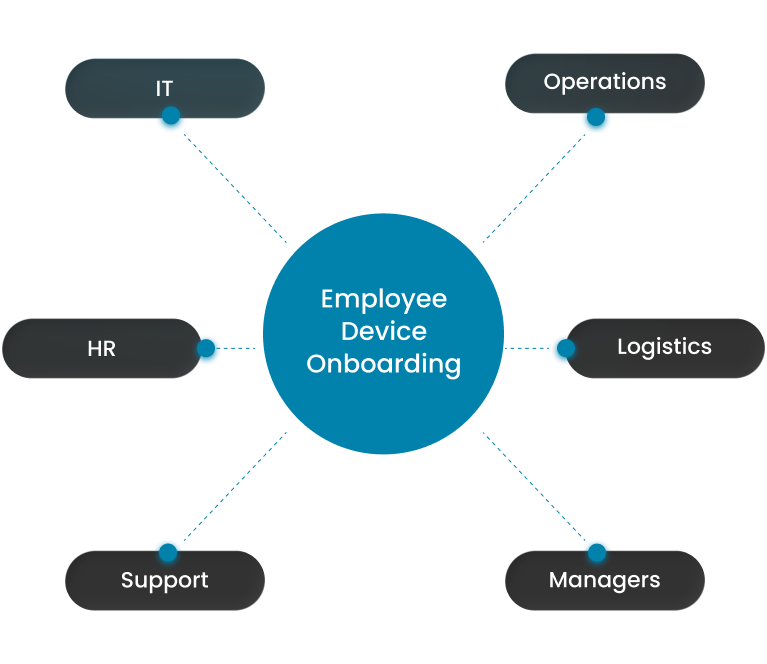
The process connects HR, IT, Operations, logistics, managers, and employee support so equipment does not become a barrier to a successful first day.
Day-One Readiness Starts Before the Device Ships
Shipping equipment is only one step.
Before a device leaves for an employee, teams need to know who is starting, when the employee begins, where the employee will work, what equipment is required, how it should be prepared, and who owns each open action.
Rely-IQ connects those details so delivery remains part of a complete employee-readiness process.
Device Shipped
A tracking number confirms that a package is moving. It does not confirm that an employee is ready to work.
From New-Hire Request to Day-One Readiness
Every employee-device onboarding request should move through a clear, repeatable workflow.
Rely-IQ connects the employee details, equipment needs, preparation, logistics, communication, and follow-through required to move each request forward.
One shared workflow keeps the employee, equipment, start date, owner, and readiness status aligned.
01
Request
Capture the employee, role, work location, start date, equipment needs, and relevant onboarding details.
02
Plan
Confirm device requirements, inventory availability, delivery timing, responsibilities, and any missing approvals or details.
03
Prepare
Assign, inspect, package, and coordinate device preparation according to the approved requirements and service scope.
04
Deliver
Manage shipping, tracking, employee communication, and delivery to the approved location.
05
Confirm
Verify receipt, identify unresolved needs, and confirm that the equipment reached the intended employee.
06
Support
Connect the employee with the appropriate path for setup questions, device issues, or additional assistance.
One shared workflow keeps the employee, equipment, start date, owner, and readiness status aligned.
Match the Equipment to the Role and Work Environment
The right onboarding experience begins with understanding the employee, not simply selecting the next available device.
Rely-IQ helps align equipment, timing, location, and support expectations with the employee’s approved needs.
The right device is the equipment that fits the employee’s role, location, timing, and approved needs.
Role Requirements
Identify the equipment and technology needed for the employee’s responsibilities.
Work Location
Plan for office, remote, hybrid, field, or multi-location work.
Start Date
Coordinate preparation and delivery around the employee’s expected first day.
Available Inventory
Review suitable equipment already available before automatically creating a new purchasing need.
Manager or Department Needs
Account for approved requirements associated with the employee’s team, role, or function.
Support Expectations
Establish where the employee should go for setup questions or device-related assistance.
The right device is the equipment that fits the employee’s role, location, timing, and approved needs.
Managed Behind the Scenes
What Rely-IQ Coordinates
Employee device onboarding requires several activities to stay aligned before the employee begins work.
Rely-IQ helps manage the work between the onboarding request and the employee’s first day.
Onboarding Intake
Collect the employee, role, location, timing, and equipment details needed to begin.
Device Assignment
Match appropriate available equipment with the intended employee based on approved requirements.
Device Preparation
Coordinate inspection, packaging, assignment, and other agreed preparation activities.
Shipping and Delivery
Manage delivery planning, tracking, employee updates, and receipt confirmation.
Documentation and Status
Maintain visibility into progress, ownership, open activity, and completed steps.
Exception Follow-Through
Address changes, delays, missing details, and unresolved readiness needs.
Rely-IQ helps connect the people, equipment, timing, and follow-through required to prepare an employee for day one.
Know Which Employees Are Ready, and Which Need Attention
Onboarding problems are easier to address when teams can see them before the employee’s first day.
Rely-IQ helps keep status, ownership, timing, and exceptions visible throughout the workflow.
Teams can focus on employees who need attention instead of discovering onboarding gaps on the first day.
Request Received
The employee and onboarding details have been submitted.
Awaiting Information
Role, location, start date, equipment, approval, or delivery details remain incomplete.
Preparation in Progress
Equipment is being assigned, inspected, packaged, or prepared according to the approved requirements.
Ready to Ship
The device has completed the agreed preparation steps and is waiting for delivery.
In Transit
Equipment is moving to the employee or approved destination.
Delivered
The equipment has reached the intended location.
Attention Required
A delay, missing detail, address issue, inventory concern, or other exception may affect readiness.
Ready for Day One
Required device-related onboarding activities have been completed or confirmed.
Teams can focus on employees who need attention instead of discovering onboarding gaps on the first day.
Keep the Process Moving When Details Shift
Onboarding plans do not always remain the same between the initial request and the employee’s start date.
A dependable workflow should help teams respond without losing track of the employee, equipment, destination, timing, or owner.
Start Date Changes
Adjust preparation and delivery timing when the employee’s first day moves.
Address Updates
Revise delivery plans when an employee relocates or provides a different approved destination.
Role or Equipment Changes
Review device needs when responsibilities or approved technology requirements change.
Inventory Is Unavailable
Identify an alternative device, purchasing need, or revised onboarding plan.
Delivery Is Delayed
Provide updates and determine the appropriate response when equipment may not arrive as expected.
The Hire Does Not Start
Stop, redirect, recover, or reassign equipment when the onboarding event changes.
The strength of an onboarding process is revealed when the original plan changes.
Keep HR, IT, Operations, and Managers Aligned
Employee device onboarding crosses several departments, but it should not require each team to maintain a separate version of the workflow.
Rely-IQ helps connect the responsibilities and details required from each participant.
HR
Provides employee timing, status, location, and relevant onboarding details.
IT
Defines approved equipment, configuration, access, and technical requirements.
Operations
Coordinates workflow progress, logistics, vendors, ownership, and outstanding actions.
Hiring Managers
Confirm role-specific needs and help resolve employee or department questions.
Rely-IQ
Connects the request, employee, device, delivery, communication, status, and managed follow-through.
Everyone understands their role while working from the same onboarding process.
Create a More Consistent Day-One Experience
An employee’s first impression begins before the first meeting, login, or assignment.
When equipment arrives as expected and employees understand what happens next, the experience feels more organized and intentional.
Employee readiness is shaped before the first login, meeting, or task.
Equipment Arrives as Expected
Employees are less likely to begin work waiting for essential equipment.
Instructions Are Clear
Employees understand what they received, what they should do next, and where to ask for help.
Fewer First-Day Surprises
Open equipment, delivery, or readiness issues can be identified earlier.
Support Is Easier to Find
Employees have a defined path for setup questions and device-related needs.
The Experience Feels Organized
A dependable device experience reinforces that the organization was prepared for the employee’s arrival.
Employee readiness is shaped before the first login, meeting, or task.
Reduce the Coordination Behind Every New Hire
Each new employee can create a series of emails, tickets, approvals, shipping tasks, status requests, and follow-ups.
Rely-IQ helps manage that coordination so HR, IT, Operations, and managers can stay informed without personally handling every handoff.
Fewer Manual Handoffs
Reduce repeated emails and updates among HR, IT, Operations, managers, and vendors.
Less Shipping Coordination
Reduce the internal effort required to prepare, track, and confirm equipment deliveries.
Clearer Ownership
Make it easier to identify who is responsible for each open activity.
Fewer Status Requests
Give teams greater visibility without requiring constant follow-up.
More Consistent Processes
Use one onboarding approach across offices, remote employees, and growing teams.
More Time for Higher-Value Work
Allow internal teams to focus on responsibilities that require their expertise.
Your teams stay informed without having to personally coordinate every onboarding detail.
Platform Visibility + Managed Execution
Technology and Managed Onboarding Working Together
The platform keeps the employee, device, timing, status, ownership, and open actions visible. The Rely-IQ team helps coordinate the work required to move each request toward readiness.
The Platform Helps Provide
- Employee and onboarding context
- Device assignment and status
- Workflow progress
- Ownership and open actions
- Shipping and delivery information
- Exception visibility
- Onboarding history
The Rely-IQ Team Helps Coordinate
- Onboarding intake and planning
- Device assignment and agreed preparation
- Packaging and delivery
- Employee communication
- Changes and exceptions
- Delivery confirmation
- Support handoff and follow-through
The platform shows where each onboarding request stands. Our team helps move the employee toward day-one readiness.
Built for Every Work Environment
Support Office, Remote, Hybrid, and Distributed Employees
The onboarding experience should remain consistent even when employees do not work in the same place.
Rely-IQ helps organizations coordinate device onboarding across different work environments, locations, and hiring patterns.
Office-Based Employees
Prepare and deliver equipment to a central office or approved internal location.
Remote Employees
Coordinate device delivery directly to employees working outside a company office.
Hybrid Teams
Support employees working between office and remote environments.
Multiple Locations
Maintain a consistent approach across branches, regional offices, and distributed teams.
Field and Mobile Employees
Coordinate equipment needs for employees working across changing or nontraditional locations.
Rapid Hiring Periods
Help organize increased onboarding volume through a repeatable workflow.
Location should change the delivery plan, not the quality of the onboarding process.
Explore Related Services and Platform Capabilities
Employee device onboarding works best when preparation, delivery, communication, support, and reporting remain connected.
New Hire & Team Swag Kits
Coordinate branded welcome kits and employee packages alongside the onboarding experience.
Multi-Location Logistics
Manage delivery, tracking, redirects, and exceptions across offices and remote employees.
Managed Support & Employee Experience
Give employees a clear path for setup questions, device issues, and ongoing support.
Analytics & Reporting
See onboarding status, readiness, ownership, open work, and exceptions across the workflow.
Prepare Every Employee for a Better First Day
A better device-onboarding experience begins with understanding how employee details, equipment requirements, preparation, delivery, and support are managed today.
We’ll learn how your teams divide responsibilities, where delays or missed handoffs occur, how remote deliveries are managed, and which activities consume the most internal time.
From there, Rely-IQ can help identify practical opportunities to create a more organized, visible, and repeatable path toward day-one readiness.
Rely-IQ solutions are scoped around your employee volume, device activity, operational requirements, and selected services. Organizations can begin with one focused service and expand as their workforce and needs grow.
Frequently Asked Questions About Employee Device Onboarding
What is employee device onboarding?
Employee device onboarding is the coordinated process of identifying a new hire’s equipment needs, assigning and preparing the appropriate device, managing delivery, communicating with the employee, and confirming that device-related onboarding activities are ready for the employee’s start date.
When should the employee device onboarding process begin?
The process should begin as soon as the organization has confirmed the employee’s start date, role, work location, and approved equipment requirements. Starting early gives HR, IT, Operations, and logistics teams more time to address missing information, inventory needs, preparation, delivery, and unexpected changes.
What does Rely-IQ coordinate during device onboarding?
Rely-IQ can help coordinate onboarding intake, device assignment, agreed preparation activities, packaging, delivery planning, shipment tracking, employee communication, status updates, receipt confirmation, exceptions, and the handoff to ongoing support. The specific services included should be confirmed during planning.
Can Rely-IQ support remote employees and multiple office locations?
Yes. Rely-IQ can help coordinate employee device onboarding across offices, remote employees, hybrid teams, field locations, and distributed workforces. The process can include location-specific delivery planning, employee communication, tracking, exception follow-up, and visibility for the teams involved.
Does Rely-IQ replace an organization’s internal IT team?
No. Rely-IQ is designed to work alongside internal IT, HR, Operations, and hiring managers. It provides additional capacity and helps coordinate device-related onboarding work so internal teams can maintain appropriate technical and organizational responsibilities while spending less time managing routine handoffs and follow-up.