
- Platform
- Solutions
- Industries
- Results
-
-
Business Value
- Results & ROI
- ROI Calculator
-
- Resources
-
-
Learn
- Resources Center
-
Evaluate
- Workforce Assessment
-
Support
- Help Center
-
-
- Company
Support Rapid Hiring & Distributed Growth
Workforce growth creates operational work long after the hiring decision is made.
That work can include employee details, device requirements, approvals, destinations, equipment preparation, New Hire & Team Swag Kits, delivery, Managed IT Services, and assignment records.
When every employee follows a different path, adding more people also creates more handoffs, more follow-up, and more opportunities for something to fall behind.
Rely-IQ helps organizations support growing and distributed teams through more consistent employee-device, swag, logistics, support, and lifecycle processes.
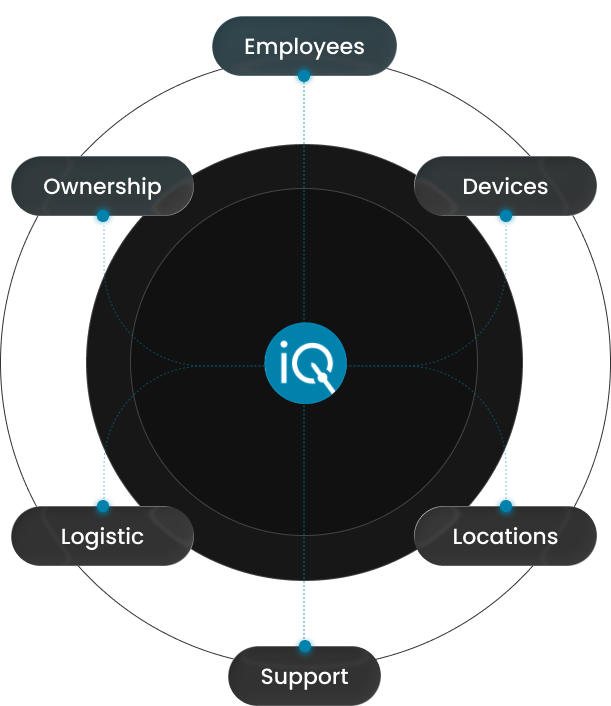
Rapid hiring creates operational pressure when employee details, role requirements, devices, approvals, destinations, new hire swag kits, delivery, Managed IT Services, and assignment records are managed through separate teams and systems.
Distributed growth adds more employee profiles, work locations, delivery paths, exceptions, and support needs.
Rely-IQ helps organizations standardize recurring requirements, coordinate the employee technology work that follows an approved hire, and maintain visibility across hiring waves and distributed teams.
Growth Multiplies the Work Behind Every Hire
Recruiting and approving an employee is only the beginning of operational readiness.
Each approved hire may require teams to confirm the role and start date, determine technology needs, collect approvals, verify the work location, establish a delivery destination, prepare equipment, coordinate a new hire swag kit, confirm delivery, and provide a clear Managed IT Services path.
As hiring volume rises, those activities multiply across departments, vendors, locations, and start dates.
A process that worked for occasional hires may become difficult to manage when the organization adds employees continuously, expands into new regions, or supports several hiring waves at once.
Growth becomes harder to support when every new hire creates a new coordination process.
Recognize the Warning Signs
Workforce growth often exposes weaknesses that were less visible when hiring volume was lower.
Employees may still get started, but internal teams spend more time requesting information, checking progress, resolving exceptions, and coordinating work that follows a different path for every hire.
Growth exposes the weaknesses in a process that may have worked when hiring volume was lower.
IT and Operations receive employee details too close to the start date to plan devices, new hire swag kits, delivery, and support effectively.
Device standards, accessories, requirements for new hire swag kits, approvals, and delivery expectations vary without a clear framework.
Teams repeat the same intake, preparation, communication, delivery, and follow-up for every approved hire.
Each home, office, branch, region, or field location follows a different operating path.
HR and managers contact IT, vendors, or logistics providers individually to determine what has been approved, prepared, shipped, received, or delayed.
Employees start without a clear Managed IT Services path or with unresolved questions about equipment, delivery, or what happens next.
Several Gaps Create One Scaling Problem
Rapid hiring does not create operational pressure simply because employees are joining quickly.
Pressure grows when hiring volume increases but the process remains fragmented, incomplete, or dependent on individual follow-up.
Operational teams cannot plan for upcoming employees, roles, locations, start dates, or expected requirements.

Role, manager, location, contact, destination, timing, or other required information is unavailable.
Remote, office, branch, field, and hybrid employees follow unrelated workflows rather than one adaptable operating model.
Every employee setup begins with a new series of questions, decisions, and approval requests.
HR, IT, Operations, Finance, managers, vendors, and logistics providers manage separate parts of the process without one shared view.
Start-date changes, address updates, shipment delays, role changes, device substitutions, and changes to new hire swag kits create email threads and individual follow-up.
Workforce growth becomes difficult when volume increases faster than the process can repeat.
Growth Affects Every Operational Team
When growth is not supported through a repeatable operating model, the pressure spreads beyond the team that approved the hire.
Each department may own only part of the employee’s start, but every missing detail, unclear handoff, or unresolved exception creates more work across the organization.
Spend more time confirming information, checking progress, correcting details, and communicating with employees.
Receives late requests, repeated questions, urgent device requirements, and issues that could have been identified earlier.
Coordinates destinations, vendors, logistics, new hire swag kits, exceptions, and unresolved actions across several employee starts.
Must explain requirements, provide missing approvals, request updates, and resolve last-minute issues.
Faces limited demand visibility, urgent purchasing requests, and fewer opportunities to consider approved equipment already available for use.
Experience uncertainty around equipment, new hire swag kits, delivery, Managed IT Services, and what should happen before or after the start date.
When growth is not operationally supported, the pressure spreads across the organization before the employee even starts.
Plan for Demand Before It Becomes Urgent
Teams can support hiring more effectively when they understand upcoming demand before each start date becomes urgent.
Hiring visibility does not need to predict every final requirement. It should provide enough approved information to anticipate volume, identify common employee profiles, prepare for distributed destinations, and recognize exceptions requiring additional attention.
Understand how many employees may begin during the upcoming period.
Identify whether hiring is continuous, seasonal, project-based, location-based, or grouped into hiring waves.
Connect common employee types with the technology and new hire swag kits commonly associated with the role.
Understand where employees will work and where approved devices or new hire swag kits need to go.
Identify approved devices, accessories, new hire swag kits, delivery paths, and Managed IT Services options associated with common employee profiles.
Identify specialized roles, unusual locations, timing changes, approval requirements, or other needs requiring additional coordination.
Teams can support hiring more effectively when demand becomes visible before each start date becomes urgent.
Standardize Without Treating Every Employee the Same
Supporting growth does not require giving every employee the same equipment, swag items, delivery path, or support experience.
It requires defining what can be repeated for common roles and work environments while preserving a clear path for specialized needs.
Rely-IQ helps connect employee profiles with the device, new hire swag kit, destination, and Managed IT Services requirements used most often.
Connect the employee’s responsibilities with the approved technology and operational requirements associated with the position.
Account for office, remote, hybrid, branch, field, or mobile work.
Identify approved device types, accessories, and other included equipment expectations.
Connect approved branded products, packaging, materials, or role-specific items included for employees joining the organization.
Establish the approved destination and delivery path.
Identify where the employee should begin when technology assistance is required and how requests can move to the appropriate resource.
Standardization should reduce repeated decisions without ignoring the differences that matter.
Begin With a Complete Trigger
A scalable process should begin when the approved hire enters the employee-operations workflow, not through separate requests sent to different teams.
The initial trigger should provide enough information to identify the employee, understand the role, establish timing, confirm the location, connect the approved requirements, and assign responsibility for the next actions.
Confirm the individual and approved contact information.
Identify the department, manager, employee type, and applicable requirements.
Record the approved date and relevant timing constraints.
Identify the employee’s work environment and current delivery destination.
Connect included devices, accessories, new hire swag kits, delivery needs, and Managed IT Services requirements.
Identify the teams or individuals responsible for approval, preparation, communication, delivery, support, and follow-through.
A scalable process begins with one complete trigger, not a series of disconnected requests.
One Process Across Every Team
Supporting a new employee requires information, decisions, and actions from several participants.
Growth becomes more difficult when each team sees only its part of the process or receives employee information at a different time.
Rely-IQ helps connect the responsibilities and context required across the employee’s operational start.

Provides approved employee, role, start-date, contact, location, and policy information.
Confirm role-specific needs, approvals, business priorities, and known exceptions.
Defines technical standards, approved devices, specialized requirements, and advanced support responsibilities.
Coordinates progress, destinations, vendors, logistics, new hire swag kits, and exceptions.
Provides budget, purchasing, approval, and asset-use context where required.
Complete approved device, product, branded swag kit, packaging, carrier, or delivery activities.
Connects employee information, device requirements, new hire swag kits, logistics, communication, Managed IT Services, status, exceptions, and lifecycle records.
Growth is easier to support when every participant receives the information it needs and knows what it owns.
One Growth-Ready Operating Model
A growth-ready process should make recurring work easier to repeat while giving exceptions a defined path.
The goal is not to remove the differences among employees, roles, and locations. It is to keep those differences from forcing the organization to recreate the entire process every time someone joins.
Growth becomes more manageable when repeatable work follows one model and exceptions have a defined path.
Use upcoming hiring information to understand expected volume, roles, timing, and locations.
Create repeatable employee profiles for common roles and work environments.
Begin with complete approved employee information.
Connect devices, new hire swag kits, communication, logistics, Managed IT Services, and assignment activity.
Keep changes, delays, missing information, and specialized requirements visible.
Document whether included operational requirements reached their intended outcome.
Coordinate the Complete New-Hire Experience
A new employee may interact with several teams and services before beginning work.
Internally, the organization may need to coordinate a device, branded products, packaging, delivery, assignment records, and technology support. To the employee, those activities should feel like one organized start.
The employee should experience one coordinated start, even when several teams and services are involved.
Coordinate approved device requirements, preparation, delivery, confirmation, and support.
Coordinate new hire swag kits for employees joining the organization and team swag kits for existing teams, group initiatives, events, launches, or engagement programs where relevant.
Connect approved destinations, shipment activity, routing, and exceptions.
Give employees a clear starting point through Tier 1 IT Support. Requests requiring additional expertise, organizational authority, vendor involvement, or another approved resource can continue through a defined escalation and follow-through path.
Connect the employee with assigned devices and related lifecycle information.
Maintain context when the employee later needs Managed IT Services, a replacement device, employee swag kits, equipment recovery, or another lifecycle action.
Consistency Across Every Work Environment
Distributed growth creates more destinations, delivery paths, work environments, and support needs.
The operating model should remain consistent enough to provide visibility and accountability while adapting each employee’s device, new hire swag kit, delivery, communication, and Managed IT Services path to the location.
Location should shape the
delivery and support path,
not create an entirely
separate operating model.
Coordinate employee requirements through central, regional, or approved office locations.
Manage destinations, device delivery, new hire swag kits, communication, Managed IT Services, and assignment records across home locations.
Maintain continuity as employees work between office and remote environments.
Use a more consistent operating model across sites.
Adapt equipment, delivery, communication, and support to changing or nontraditional work environments.
Apply the approved process to time-limited or specialized workforce needs.

Connect the employee with assigned devices and related lifecycle information.
Manage destinations, device delivery, new hire swag kits, communication, Managed IT Services, and assignment records across home locations.
Maintain continuity as employees work between office and remote environments.
Use a more consistent operating model across sites.
Adapt equipment, delivery, communication, and support to changing or nontraditional work environments.
Apply the approved process to time-limited or specialized workforce needs.
Location should shape the delivery and support path, not create an entirely separate operating model.
Growth Does Not Always Follow the Plan
Even a well-planned hiring process must account for employees, requirements, destinations, and timing that change.
A defined exception path helps teams respond without losing visibility or rebuilding the entire workflow.
Update preparation, delivery, communication, and related timing.
Adjust the approved destination and associated logistics information.
Update device, accessory, new hire swag kit, approval, or Managed IT Services requirements.
Move through the approved substitution, delay, or alternative process where applicable.
Update approved products, quantities, packaging, destination, or timing.
Maintain visibility, communicate the change, and identify the next action.
Stop, redirect, recover, or otherwise resolve prepared or shipped equipment and new hire swag kits according to the approved process.
Adjust planning as employees are added, delayed, moved, or removed from the hiring wave.
Route the employee through the appropriate technical, managerial, financial, or operational approval path.
A growth-ready process must manage the hires that change, not only the ones that follow the original plan.
Visibility Across Every Hiring Wave
Hiring volume is easier to manage when teams can see what information is complete, which approvals remain open, what is being prepared or delivered, and where an exception requires action.
Rely-IQ helps connect the employee, role, location, start date, included requirements, current owner, status, and next action.

Employee, role, location, destination, timing, or requirement information remains incomplete.
A manager, IT, Finance, HR, or another authorized participant must act.
Approved device, new hire swag kit, delivery, and Managed IT Services requirements are being coordinated.
Included devices, branded swag kits, or other approved items are being prepared.
The approved shipment or handoff is moving toward the employee.
The employee must confirm information, receipt, or another approved step.
A change, delay, missing item, or other exception requires follow-up.
Included pre-start requirements have reached their documented readiness state.
The employee has started and a Managed IT Services, employee swag kit, or device-lifecycle action remains open.
Growth is easier to manage when teams can see which employees are progressing and where action is still required.
A Consistent Employee Experience at Scale
A scalable internal process should not feel complicated to the employee.
Clear communication should help each new hire understand what information has been confirmed, which included devices or swag items to expect, when relevant activity changes, and where to begin when technology support is needed.
A scalable process should feel organized to the employee, not like a larger internal workflow.
Confirm approved employee information and the current delivery destination.


Communicate included devices, new hire swag kits, delivery expectations, and Managed IT Services information where appropriate.
Provide relevant progress information as approved items move toward the employee.
Explain when information, timing, equipment, new hire swag kits, or delivery activity changes.
Confirm whether included items reached the employee or whether another action remains open.
Explain that Tier 1 IT Support provides the starting point for employee technology questions and the gateway to additional approved support when needed.
Platform Visibility + Managed Execution
Visibility helps teams understand where each approved hire stands.
But visibility alone does not confirm missing information, coordinate devices and new hire swag kits, communicate with employees, manage logistics, resolve exceptions, or provide Managed IT Services.
The Rely-IQ platform helps make workforce-growth activity visible. The Rely-IQ team helps coordinate the work required to move each included requirement forward.
The platform shows how each employee is progressing. Our team helps coordinate the work required to support that growth.
The Path to Growth-Ready Operations
Supporting workforce growth may require more than one service.
The right solution depends on whether the organization is losing visibility or time through device onboarding, new hire swag kits, delivery, Managed IT Services, lifecycle records, or distributed logistics.

Coordinate approved device requirements, preparation, delivery, confirmation, and support for new employees.

Coordinate new hire swag kits for employees joining the organization, team swag kits for existing teams and group initiatives, and broader employee swag kit programs where included.

Give employees a clear starting point through Tier 1 IT Support, with a defined path to additional assistance, internal IT, specialists, vendors, or other approved resources when needed.

Connect new employee assignments with ongoing support, replacement, recovery, redeployment, and retirement.

Coordinate device and branded swag kit movement, destinations, tracking, and exceptions across distributed teams.

See hiring-wave status, ownership, incomplete information, exceptions, readiness, and unresolved activity.
A stronger growth-ready process begins with understanding expected hiring volume, start-date patterns, employee roles, work locations, and the requirements that recur most often.
We’ll learn how approved hires currently enter the process, how devices and new hire swag kits are coordinated, how employees access Managed IT Services, who owns delivery and escalation, how exceptions are handled, and where teams repeat work or lose visibility.
From there, Rely-IQ can help identify the services, workflow changes, and support paths that may help the organization support more employees across more locations.
Rely-IQ solutions are scoped around your employee volume, hiring activity, operational requirements, and selected services. Organizations can begin with the area under the most pressure and expand as headcount, locations, and workforce needs grow.
Workforce Growth Questions
Rapid hiring creates operational pressure because each approved employee can require role information, device requirements, approvals, destinations, preparation, new hire swag kits, delivery, Managed IT Services, and assignment records. When those activities are managed by separate teams and systems, increasing hiring volume also increases handoffs, manual follow-up, and exceptions.
Organizations can support rapid hiring by making upcoming demand visible, standardizing common employee profiles, beginning with complete approved-hire information, defining ownership, coordinating devices and logistics through repeatable processes, maintaining status visibility, and giving changes and exceptions a clear path toward resolution.
Companies can create repeatable employee profiles that connect common roles and work environments with approved devices, accessories, new hire swag kits, delivery paths, and Managed IT Services requirements. Standardization should reduce repeated decisions while preserving a defined process for specialized roles, unusual locations, changing requirements, and other exceptions.
HR can provide expected hiring volume, approved employees, roles, managers, start dates, locations, and relevant policy information. IT can define approved technology standards, common device profiles, specialized requirements, and support responsibilities. A shared process should connect this information with approvals, preparation, delivery, Managed IT Services, exceptions, and assignment records.
New hire swag kits can be included as part of the employee’s coordinated start. Rely-IQ’s New Hire & Team Swag Kits service can help connect approved branded products, packaging, destinations, delivery activity, employee communication, and exceptions with the broader device-onboarding and employee-operations process.
Yes. Rely-IQ can help coordinate employee information, approved device and new hire swag kit requirements, destinations, communication, delivery activity, exceptions, Managed IT Services, and lifecycle records across offices, homes, branches, field environments, and regional locations. Tier 1 IT Support gives employees a clear starting point and gateway to additional approved support.
No. Rely-IQ helps coordinate the employee technology and operational work that begins after an approved hire enters the process. Recruiting, HR, internal IT, managers, and existing providers can continue owning hiring decisions, employee records, policies, advanced technical responsibilities, infrastructure, security, and other organizational functions.
Support Rapid Hiring & Distributed Growth explains why increasing hiring volume and additional work locations create operational pressure, how organizations can standardize recurring requirements, and which processes need greater visibility. Employee Device Onboarding is the Core Service that coordinates the request, planning, preparation, delivery, confirmation, and support for an employee’s approved device needs.